

AI Agent Approval Rules Every Small Business Needs
Write one page that says what your AI agent does alone and what waits for your yes. It takes about 30 minutes.

The first week an agent can send email, issue a refund or edit a customer record, you have to decide when it acts and when it asks. Most owners decide by feel, and that holds up until the first wrong email goes out. This post walks through AI agent approval rules for small business owners, as one page you can write in about 30 minutes. It's built from product documentation and published guides, not from a test of our own.
What counts as an approval rule
An approval rule says which actions your agent may take alone and which ones stop and wait for a person. By agent, we mean AI that takes steps in your apps, not just one that answers questions. Zapier's article from October 14, 2026 describes the idea as approval, rejection or feedback checkpoints before a workflow continues.
A rule is different from a login. A login sets what the agent can reach. A rule sets what it may do once it gets there.
How to write your approval rules
Work through these six steps in order. Each one adds a line to your page.
Step 1: Note four facts about every action
List everything your agent can do. Then write four facts next to each action:
- Whether you can undo it
- Whether it leaves your business
- Whether it moves money or changes a customer or money record
- Whether it acts on text from outside, like a customer email or a web page
A guide from eSEOspace, published November 2, 2026, asks a similar set of questions and calls its approach an editorial framework, not a standard. A checklist from WorkOS, dated September 30, 2026, puts approval from outside the agent for irreversible or external actions on its short list of eight must-do controls. WorkOS sells sign-in tools to software makers, so its list is written for them.
The fourth fact is the sneaky one. Hidden text in an email or a page can push an agent to act. Anthropic's Claude Duet safety page, dated October 23, 2026, says its separate safety check runs outside the model doing the work, so instructions hidden in a page can't change the result.
Step 2: Sort the actions into five levels
The eSEOspace guide sorts actions into five levels. We simplified the names:
- Do it and log it
- Do it and check a sample
- Ask first
- Draft only, and a person finishes it
- Never
Here's a starting page for a service business. It's our example, not a rule, so change it to fit your shop:
- Draft a reply to a customer: do it and log it
- Tag or sort the inbox: do it and check a sample
- Update a field on a customer record: do it and check a sample
- Send a reply to a new customer: ask first
- Issue a refund, delete a record or change a price: ask first
- Write contract or legal wording: draft only
- Move money between accounts: never
The eSEOspace table lands in the same place on refunds, deletes and legal advice. Anthropic's page lists moving money between accounts among the actions that stay off limits even when you approve, so a hard no has company.
Step 3: Set your own limits in numbers
The rule needs numbers, and they have to be yours. Pick a dollar amount above which the agent asks, for refunds and for spending. eSEOspace's advice is to set a dollar threshold, check a sample below it and approve above it.
Choose the amount where one mistake would hurt, not the amount where you'd happen to notice. We won't give you a number, because none of the sources we read gives one for a small business.
Then name the customers who always get a human. New customers, large accounts and upset customers are a good start. That part is our advice, so adjust it.
Step 4: Make the request show enough to decide
A yes means little when the request is vague. Anthropic says Claude Duet shows the action, the destination and the content, including every recipient, before it sends something sensitive, pays for something or deletes anything.
An Alignbase post from August 3, 2026 goes further. It calls a click a weak control when the reviewer has no source data, ten seconds and no way to change the result. It says to give the reviewer a short packet of evidence and link to the full record.
So write down what a good request shows:
- The action, in one plain sentence
- Where it goes, and to whom
- The exact content, such as the full email
- What it costs
- Why the agent is asking
If your agent's request shows less than that, you're approving blind. Look for a setting that adds detail, or ask the vendor.
Step 5: Enforce the rule outside the prompt
A rule typed into a prompt is a request to the agent. A setting in the product is a lock. Alignbase says useful oversight enforces intervention outside the model, and the WorkOS checklist says to check authorization on every tool call, not once per session.
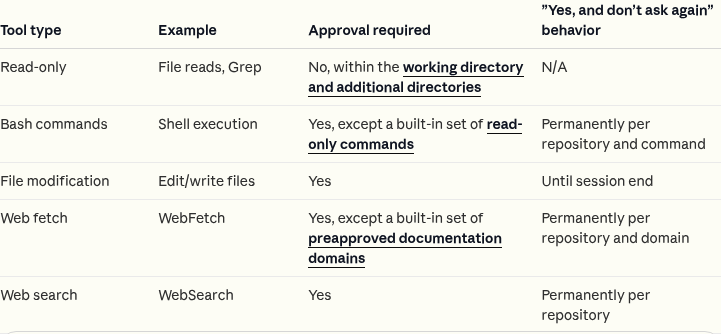
For you, that means looking for a real permissions or approval setting, a block list, or simply not connecting an app. Claude Code, Anthropic's coding tool, shows what a real setting looks like. Its permissions page says rules are checked in order, deny first, then ask, then allow, and the first match decides.
Zapier's Human in the Loop guide, dated January 19, 2026, says the step needs a Pro plan or higher. It also says that on Pro you can only send approval requests to yourself. That's one source, so check your own plan before you count on it.
Step 6: Loosen one permission at a time
Start in watch mode. The agent drafts, and you compare its draft with what you would have done. After it has been right for several rounds on one narrow action, move that action down a level. Then do the next one.
Keep money, legal wording and upset customers on approval. Anthropic says some steps never get a standing yes, however often you've approved them, such as paying or sending money and deleting an order. eSEOspace says to relax approval for customer emails that use tested templates, and to keep sampling.
Brian's April 2026 Computer Use test shows the same habit. As the Lawton Learns issue from April 7, 2026 reports, he kept it to folder cleanup, research across open tabs and light website scraping, and stayed away from sensitive data on purpose. Review your page once a month, and again whenever you connect a new app.
When approving everything backfires
Too many requests teach people to tap through them. Anthropic's page calls approval fatigue a serious issue. The fix is to move low-risk actions you can undo down a level on purpose, instead of clicking yes faster.
The second trap is that nobody's there to answer. Alignbase lists what happens when no qualified reviewer is available among the questions to settle ahead of time. Name a backup person. We'd also treat a request nobody answers as a no, not a yes.
The third trap is trusting a source because it looks friendly. Text the agent reads from a customer or a page can try to steer it. Anything triggered by outside text stays at ask first until you trust the setup.
When these rules are not enough
Rules lower the chance of a bad action. They don't make an agent safe. A yes from you still sends the wrong email if you didn't read it.
We haven't tested the products named here, so everything above is what their pages say. If the agent will touch health, legal or payroll records, ask the vendor in writing what it keeps and for how long before you connect anything. And if you can't review requests within a working day, wait to connect the agent.
What to do today
Open the agent you use. Copy the five levels onto one page, and list every action it can take. Choose your dollar limit, then turn on approval for the ask-first level this week. Put a monthly review on your calendar.
We cover new agent launches in the Lawton Learns newsletter, so you'll know when your page needs a new line.
In Lawton Command Center, spending, publishing, outside email, deleting and access changes each wait for you. Each one comes as a request with the action, the expected result, the cost and the evidence. Every action lands in an audit log. The how it works page lists what agents do alone and what waits for you.
Talk soon,
Brian + Andrea